


Engineering
Adventures in the Modern Monolith: How do you keep a secret at Tilt?
When 50+ Azure App Service instances restart simultaneously and all reach for the same Key Vault, things break.
· 10 minutes read
Aaron Mumm
One of the downsides of mobile app development, compared to backend or web, is the lack of control we have over our apps in the wild. While a web developer can redeploy their site and have the updated version instantly available to every user, mobile developers are reliant on Play/App Store review processes, as well as users choosing to update their apps to the latest version. This greatly slows down rapid product iteration. Server-driven UI allows us to have a greater degree of control of our app’s functionality from afar.
Something is broken in production. How do we fix it?
The answer is simple for a web or backend developer: make the fix, test it, and deploy it. Job done. But for those of us in the mobile space, the answer is a bit more complex: We don’t actually control the entire deployment lifecycle!
Once our fix is ready, releasing it to the public is at the whims of Apple, Google and their store review processes. Once past that gauntlet, and published to the store, we have to wait for users to install the new app on their device. Altogether, it can take a week or two for a change to reach the majority of our user base. This greatly gets in the way of being able to rapidly improve and iterate on our product, as well as deal with urgent bugs and crashes in a timely manner.
We do have some tools in our toolkit to help with this problem, such as tactical force update mechanisms, feature toggling, and server-side workarounds through to more strategic choices like hybrid apps. However, being able to quickly deploy new features and bug fixes to our apps in the wild is a capability most mobile developers can only dream of.
One potential solution for this problem is Server-driven UI. At Empower, we’ve recently explored this approach in our new app for the Southeast Asia market. This approach gives us significant control over the functionality of our app, while maintaining native mobile app look-and-feel and performance.
Earlier this year, Empower acquired Cashalo, a Filipino lending company. Part of the process of integrating Cashalo into the wider Empower business is building a new mobile app and backend for Cashalo, on Empower’s tech stack.
Initially, we planned to build this using the same techniques that have proven successful in our Empower US app. This stack includes native Android and iOS apps which talk to a .NET backend in a RESTful-ish way and allows for frequent client releases to deploy new features and bug fixes.
However, there had been a desire from both our product team and engineering management to take this (mostly) green-fields opportunity in the Philippines to try something new - a different approach that would give us faster iteration and development speed, and the ability to quickly build and test product experiments to deliver better outcomes for our users and the business.
From the get-go, we wanted a complete solution for moving client-side logic out of our mobile apps. So rather than the piecemeal approach of making particular screens, parts of screens or flows to be server-driven, we sought an approach that abstracted away the important facets of a mobile app to a remote system:
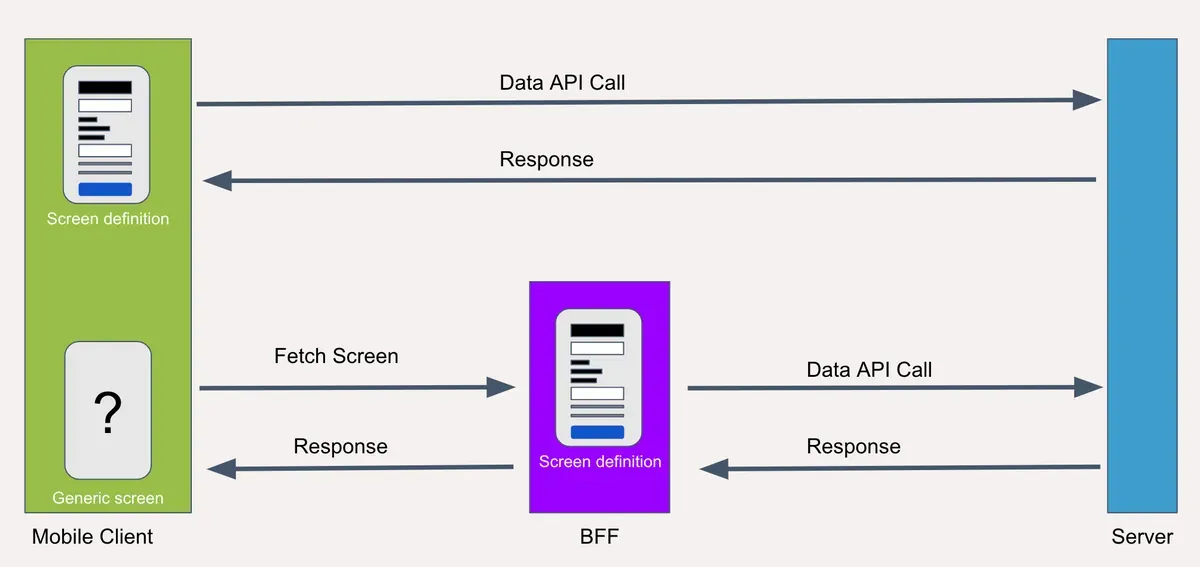
The diagram above demonstrates a traditional mobile-server approach o top, and our new approach on the bottom - which adds a Backend-for-Frontend into the mix.
In the traditional approach (top), the mobile client app contains the definition of a screen - how it looks, what data it needs to fetch from the server, and how to plug that data into its UI.
By contrast, with a server-driven UI approach (bottom), the client only knows the name of a screen it needs to display (and potentially some additional arguments). The definition of a screen is held in the Backend-for-Frontend; when a client requests a certain screen, it is the BFF that makes any required requests to our server, plugs the resulting data into the screen structure, and returns a representation of the screen to the client for rendering.
A Backend-for-Frontend is a backend server application that services a specific client, typically focusing on one user experience. This design pattern was introduced originally at SoundCloud and popularized by Sam Newman.
Empower uses a variation on this pattern whereby a backend servers are positioned as a sort of middleware that sit between our client app and general API server. Their purpose is to prepare data from the server in ways specific for each client.
This approach is powerful. It prevents domain logic from living in the client app, and decouples the apps deployment lifecycle from deployment lifecycle of the actual business code. It means the client doesn’t even know that what kind of app it is! By updating and re-deploying the BFF, you could change the entire app in an instant.
The following are a few of the more impactful tech choices we made when designing this system:
Ktor** **framework
Ktor as both a server (receiving GraphQL requests from the mobile app) and a client (making requests to our server)Docker**ized **and deployed to an **Azure App Service, **which is managed in terraform.We’ve built our server-driven UI system to meet the requirements and capabilities we need in mobile apps. A lot of the concepts are similar to those found in declarative UI frameworks like Jetpack Compose, since that is what we’re effectively doing - serving a declarative UI remotely.
Components make up the visual structure of our server-driven UI system.
Components can be a single atomic UI element, or a structure made up of multiple elements, or a container for other components.
Here are some of the examples our BFF can serve to clients :

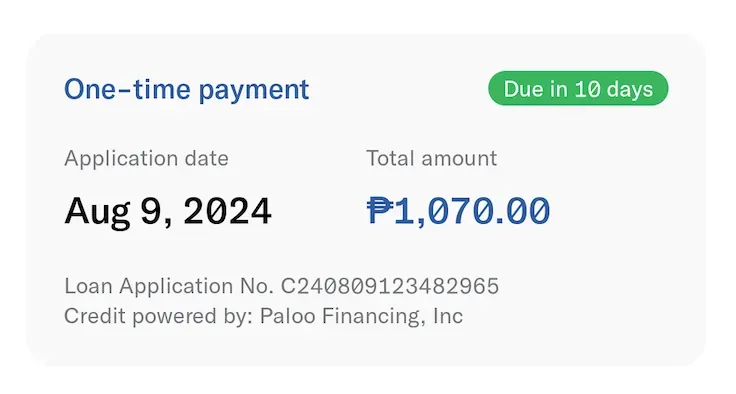
Some components are static, while others can read or write state - such as text fields or checkboxes.
We current maintain about about 40 components, each of which increases the scope of features we can build without a client release.
Pretty self descriptive, Actions describe what the client should do when various components are interacted with. Common action we use include:
Many actions also include the following:
A screen definition is defined in Kotlin code; when a screen is requested by a client, the BFF makes API calls to our server (if necessary for that screen) then builds up a Screen Response containing a **User Interface **and an initial Screen State. These are then returned to the client and displayed by a rendering layer in the mobile app; this maps Components to equivalents in Jetpack Compose (Android) or Swift UI (iOS).
The User Interface contains the Components to be displayed on screen, divided up based on which section of the screen they live in:
It also contains metadata about the screen itself like:
You can see an example of a User Interface response below.
Here is an example screen definition from our KYC flow. It contains:
NavigateScreenAction to the next screen in the flow.
{
	"top": {
		"type": "Toolbar",
		"title": null,
		"navButton": "Back"
	},
	"content": [
		{
			"type": "Header",
			"title": "Add User Profile",
			"subtitle": "Provide the following information in a few steps, to become verified and get a loan."
		},
		{
			"type": "InfoList",
			"items": [
				{
					"title": "Personal information",
					"subtitle": "Estimated completion time: 2 minutes",
					"icon": "Statement",
					"color": "PastelPink"
				},
				{
					"title": "Work information",
					"subtitle": "Estimated completion time: 2 minutes",
					"icon": "Wheel",
					"color": "PastelYellow"
				},
			],
			"backgroundColor": "LightGrey"
		}
	],
	"bottom": [
		{
			"type": "Text",
			"text": "Please make sure to provide correct and accurate information. Once submitted, changes will no longer be allowed.",
			"textStyle": "Small/DarkGrey"
		},
		{
			"type": "Button",
			"label": "Get started!",
			"action": {
				"actionType": "NavigateScreen",
				"screenKey": "KYCPersonalInfo"
			}
		}
	]
The client logic receives this payload from the BFF, and maps each component into Jetpack Compose components to render a screen that looks like this:
As you can see, with the generic mapping logic in place you could easily change the apps behavior by altering the screen data returned by the BFF:
NavigateScreenAction 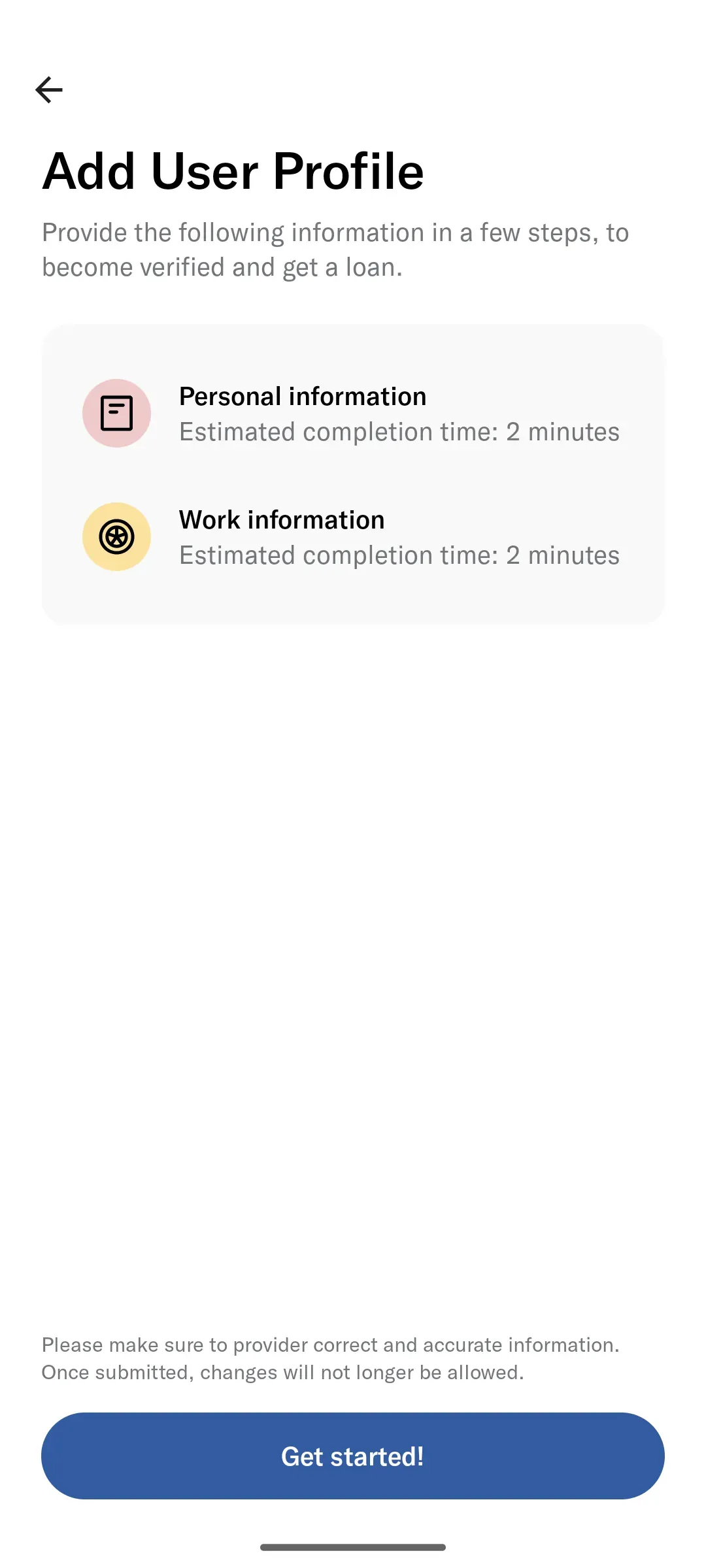
We are already seeing the benefits of this approach realized:
At the moment, our new Cashalo app is still at small scale. Our first priority going forward is expanding the capabilities and reliability of our SDUI system as we scale. Once we’ve cleared those hurdles, a couple of other items on our roadmap are:

👋 I’m Hamish, a mobile engineer from New Zealand who enjoys designing and implementing innovative software solutions. I’ve been working in the mobile space for about a decade, building apps in the utility, parking, banking and finance sectors. I aspire to work on and build solutions that make a positive impact on the world and peoples lives.
I split my time between Melbourne, Australia, and the beautiful South Wairarapa coast of New Zealand.
In my spare time I enjoy photography (mostly via drone), cycling and hiking. I also enjoy the frequent travel involved in my current role; getting to meet up with my colleagues in a new and exciting place twice a year makes all the difference when working remotely day-to-day.
When 50+ Azure App Service instances restart simultaneously and all reach for the same Key Vault, things break.

In the era of blazing fast compute and memory, it’s easy for the performance characteristics of System objects to feel like a thing of the past.

At ~~Empower~~ Tilt, a data-driven fintech startup, our lifeblood is understanding our users and how they interact with our products.
More in Engineering