



Engineering
Adventures in the Modern Monolith: How do you keep a secret at Tilt?
When 50+ Azure App Service instances restart simultaneously and all reach for the same Key Vault, things break.
· 10 minutes read
Aaron Mumm
Last updated: Aug 28, 2025
Written by Kyle Getty · 5 minutes read

In the era of blazing fast compute and memory, it’s easy for the performance characteristics of System objects to feel like a thing of the past. But scale can defeat all our expectations in the end. With String,we need to be considerate, because they are immutable! This means operations like ToUpper() create a new string in memory, and with large datasets, this can lead to performance issues.
Let’s take a look at some solutions that C# provides us, and how we can hone in on the places these can drain resources.
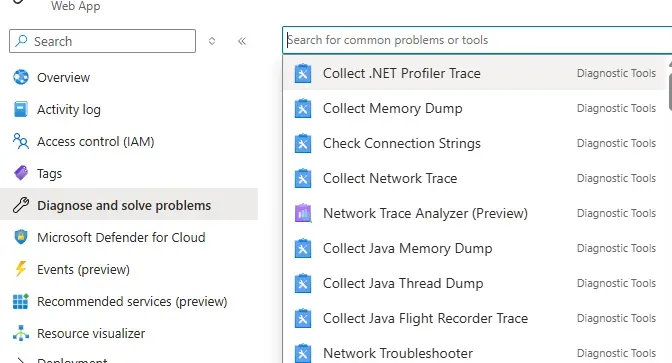
As with all performance improvements, we should start with the right diagnostic data to scope our approach. At Tilt, we had been dealing with some spiking CPU on API instances, and we had a hunch it was infrastructure related, but since we weren’t sure, we also wanted to rule out application involvement. One of the things we did was get a .NET Profiler Trace using Azure App Service Diagnostic Tools.
In the “Diagnose and solve problems blade” on the WebApp we can see a few tools available for deeper analysis of performance.
The profiler trace will create and download a zip with a .diagsession file that you can open in PerfView or in an IDE such as Visual Studio. This lets us take a look at hot function paths, and here we can see a lot of CPU usage coming from System.Globalization

Here is the LINQ query driving this usage:
query.Where(entity =>
!ListToCheck.Any(s => entity.SomeText.ToUpper().Contains(s.ToUpper()))
&& !AnotherList.Any(s => entity.SomeText.ToUpper().Contains(s.ToUpper()))
In this query, we’re trying to do a case-insensitive comparison to multiple lists of strings by changing them all to uppercase, but this results in many copies of these strings, and depending on how long they are and how many you have, these copies can really start to add up.
StringComparison.OrdinalIgnoreCase and its comparer StringComparer.OrdinalIgnoreCase
If we use these, we can remove the ToUpper() call.
query.Where(entity =>
!ListToCheck.Any(s => entity.SomeText.Contains(s, StringComparison.OrdinalIgnoreCase))
&& !AnotherList.Any(s => entity.SomeText.Contains(s, StringComparison.OrdinalIgnoreCase))
If you care more specifically on the linguistic elements of the string, consider InvariantCultureIgnoreCase or CurrentCultureIgnoreCase but note these are less performant
To compare the performance against ToUpper(), we can write a quick console app and pull out this query.
var query = new List<Entity>();
var entityCount = 1000;
var entityStringLength = 1000;

for (int i = 0; i < entityCount; i++)
{
    var rand = new Random();
    var randString = string.Join("", Enumerable.Repeat(0, entityStringLength).Select(n => (char)rand.Next(32, 127)));
    query.Add(new Entity() { SomeText = randString });
}

Console.WriteLine($"Test {entityCount} objects with {entityStringLength} char string");

var sw = Stopwatch.StartNew();

var toUpperQuery = query.Where(entity =>
!ListToCheck.Any(s => entity.SomeText.ToUpper().Contains(s.ToUpper()))
&& !AnotherList.Any(s => entity.SomeText.ToUpper().Contains(s.ToUpper())))
.ToList();

sw.Stop();
Console.WriteLine($"Query Using ToUpper() {sw.ElapsedMilliseconds}ms");
sw.Restart();

var ignoreCaseQuery = query.Where(entity =>
!ListToCheck.Any(s => entity.SomeText.Contains(s, StringComparison.OrdinalIgnoreCase))
&& !AnotherList.Any(s => entity.SomeText.Contains(s, StringComparison.OrdinalIgnoreCase)))
.ToList();

sw.Stop();
Console.WriteLine($"Query Using OrdinalIgnoreCase {sw.ElapsedMilliseconds}ms");
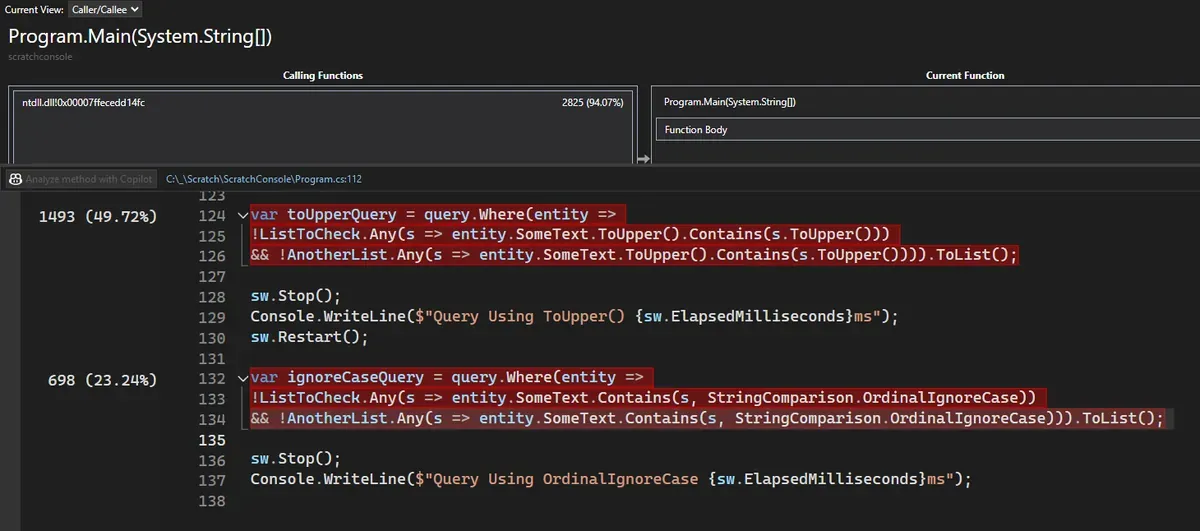
As the number of objects scale up, we can see OrdinalIgnoreCase startes to be over twice as fast in our worst case scenarios.


We can also run the profiler against the test console, and see the CPU difference for these:
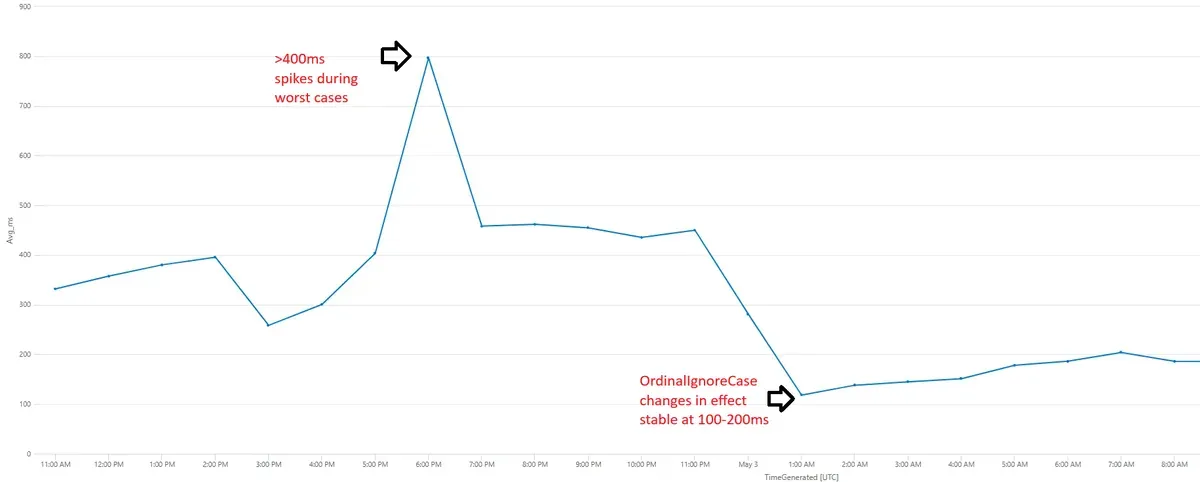
From our metrics, the average timing of this was highly variable, with the worst cases being where the query has a lot of strings to look at. As our changes roll out, this becomes much more consistent, and averages almost half of what it was before.
Performance tuning is a full time job, but .NET and Azure give us a lot of tools to prune our metrics for the worst offenders. Check out the other diagnostic tools available in app services to get a deeper picture of performance. Benchmark and validate assumptions locally using IDE profiling in Visual Studio, Rider.
Consider string operations carefully in high scale scenarios. If you need to manipulate strings use things like StringBuilder or Spans rather than $"string yourself {along}" with literals!
Software Engineer with 13+ years of experience building highly scalable platforms in Azure. With a passion for helping teams find ways to simplify process and focus on building systems that transparently enhance the development lifecycle.

When 50+ Azure App Service instances restart simultaneously and all reach for the same Key Vault, things break.

At ~~Empower~~ Tilt, a data-driven fintech startup, our lifeblood is understanding our users and how they interact with our products.

A seemingly simple FK constraint drop turned into a high-stakes locking issue that threatened database stability.
More in Engineering